


Stock & Crypto Scanner - Personal or Commercial
C++20 Stock & Crypto Scanner - 22 indicators over 240 bars. 54 µs mean / 18k per sec. 58 files / 452KB. Personal $499 / Commercial $999.
- Latency (measured)
- 54 µs
- Throughput (measured)
- 18k/sec
- Price
- $499
Measured on win32-x64 (ZachsNitro · 13th Gen Intel(R) Core(TM) i5-13420H · 12 threads) · 2026-10-11 · 5,000 iterations · one full scan (22 indicators over 240 bars, file read excluded)
About this bot
Stock & Crypto Scanner — Personal or Commercial A production C++20 scanner engine — not a script. One full scan = 22 indicators over 240 bars. Measured Performance: Measured: 54 µs mean / 18k/sec win32-x64 - 2026-10-02 - 5,000 iterations - one full scan (22 indicators over 240 bars, file read excluded) What You Get (Both Licenses): 22-point scanner engine Build Tier Standard: one worker per core, 3 retries, durable journal 58 files / 452KB source - generates matching C++20 project Binaries: Windows / Linux / macOS True-Worth priced from code: Personal $499 / Commercial $999 Choose Your License: Personal - Single Deployment - $499 ✓ 1 person, 1 deployment ✓ Personal, non-commercial use × No client resale × No white-label Commercial - Single Deployment - $999 ✓ 1 business, 1 product deployment ✓ Use in production and charge your customers × No client resale × No white-label Agency & White-Label for this engine are not on this card — they cover the whole catalogue and are arranged by contact.
Code preview
first 100 lines of modules/scanner/module.cpp - c++201// Stock & Crypto Scanner - Personal or Commercial — stock & crypto scanner module2//3// Candles in, indicators and alerts out. Five task kinds, each of which reads a4// series (or a directory of them), computes something, and writes one JSON5// report the commands render:6//7// scanner.scan indicator snapshot at the newest bar8// scanner.alert configured rules evaluated at the newest bar9// scanner.backtest the same rules replayed bar by bar, no lookahead10// scanner.correlate Pearson correlation of returns across symbols11// scanner.check parse-check the configured rules and nothing else12//13// A series arrives as CSV with a header (`"path"`), as JSON over HTTP14// (`"url"`), or as a directory of either (`"dir"`). Every handler accepts an15// `"out"` path and defaults to one inside the data directory.16//17// Rules are configuration, not code:18//19// "module": {20// "series_dir": "data/series",21// "rules": [22// {"symbol": "BTC-USD", "when": "rsi(14) < 30 and close > sma(50)",23// "note": "oversold but above trend"},24// {"symbol": "*", "when": "macd() crosses_above macd_signal()"}25// ]26// }27//28// `when` is a real expression: a tokeniser and a recursive-descent parser with29// precedence, type checking and positions in every error. An unknown indicator30// is rejected when the config is read, not when a bar happens to reach it.31//32// Nothing here approximates. EMA is seeded with an SMA and smoothed with33// 2/(n+1); RSI and ATR use Wilder's smoothing; Bollinger uses the population34// standard deviation. When a series is too short for an indicator, the report35// says so — it never carries a value computed from fewer bars than asked for.36 37#include <algorithm>38#include <cctype>39#include <chrono>40#include <cmath>41#include <cstdio>42#include <cstdlib>43#include <filesystem>44#include <fstream>45#include <map>46#include <memory>47#include <optional>48#include <set>49#include <string>50#include <utility>51#include <vector>52 53#include "bs9/agent.hpp"54#include "bs9/http.hpp"55#include "bs9/json.hpp"56#include "bs9/log.hpp"57#include "bs9/metrics.hpp"58#include "bs9/scheduler.hpp"59 60namespace fs = std::filesystem;61 62namespace {63 64constexpr const char* kScan = "scanner.scan";65constexpr const char* kAlert = "scanner.alert";66constexpr const char* kBacktest = "scanner.backtest";67constexpr const char* kCorrelate = "scanner.correlate";68constexpr const char* kCheck = "scanner.check";69constexpr const char* kScreen = "scanner.screen";70constexpr const char* kMeasure = "scanner.measure";71 72const double kNaN = std::numeric_limits<double>::quiet_NaN();73 74bool known(double value) { return !std::isnan(value); }75 76// ---------------------------------------------------------------------------77// Small text helpers78// ---------------------------------------------------------------------------79 80std::string trim(const std::string& text) {81 std::size_t begin = 0;82 std::size_t end = text.size();83 while (begin < end && std::isspace(static_cast<unsigned char>(text[begin]))) ++begin;84 while (end > begin && std::isspace(static_cast<unsigned char>(text[end - 1]))) --end;85 return text.substr(begin, end - begin);86}87 88std::string lower(std::string text) {89 std::transform(text.begin(), text.end(), text.begin(),90 [](unsigned char c) { return static_cast<char>(std::tolower(c)); });91 return text;92}93 94std::string join(const std::vector<std::string>& items, const std::string& sep) {95 std::string out;96 for (std::size_t i = 0; i < items.size(); ++i) {97 if (i > 0) out += sep;98 out += items[i];99 }100 return out;This is the real file from the archive you receive, with your listing's metadata already substituted.
Licence options
Every licence ships the same source. What differs is how far you may deploy it and whether you may put your own brand on it.
Personal is for one person on one deployment, not for business use. Commercial costs more because it covers your whole organisation on up to 3 deployments, including services you sell to your own clients: the same code, with the rights a business needs.
This listing is $499 — Standard build tier. The price decides what is in the archive; the licence marked below decides what you may do with it, and is the one that ships in your LICENSE.txt.
| Licence | Price | Deployments | White-label | Included |
|---|---|---|---|---|
Personal - Single deployment This listing | $499 one-time | 1 | No |
|
Commercial - Team use | $999 one-time | 3 | No |
|
Agency Bundle - 5 Client Pack | $5,000 one-time (all bots · contact sales) Email to buy | 5 | No |
|
Agency Unlimited ($7500 one-time) | $7,500 one-time (all bots · contact sales) Email to buy | Unlimited | No |
|
Enterprise / White-label (Custom) | CustomRequest a quote | Unlimited | Yes |
|
Personal and Commercial are sold here. Agency and Enterprise cover every bot in the catalogue and are arranged by email: use the button on that row and we reply with a payment link. Questions first? Contact us.
Enterprise is quoted rather than listed. The licence that ships in your archive's LICENSE.txt is the one marked above. Licence prices are what each grant is worth; checkout charges this listing's price, once.
One-time, compared with subscriptions
| Option | Price | Source |
|---|---|---|
| This engine | $499 Personal / $999 Commercial, once | this page |
| TA-Lib (indicator library) | free, open source | ta-lib.org |
| TradingView Essential–Premium | $14.95–$59.95/mo | stockbrokers.com |
| TrendSpider Standard–Premium | $82–$137/mo ($648–$1,092/yr) | stockbrokers.com |
Prices looked up 2026-09-27; check the source before relying on them. A hosted service gives you a web interface and its own support, which this does not; this gives you the source, offline use and no renewal.
Questions before you buy
+Can I try it before I buy?
+Does it run on Mac or Linux?
+Can my team use it?
+Are updates included?
+What if it does not work?
What's inside
Stock & crypto scanner engine: 166KB of source (3,545 lines of logic, 11 files), plus the shared agent core. Everything below is counted from that code — nothing on this list comes from the listing text.
bot alertEvaluate alert rules; deliver new ones to a webhook or Discordbot backtestReplay the rules over history with a no-lookahead proofbot checkParse the alert rules and show what each one needsbot correlateCorrelation of returns across symbols on shared barsbot measureTime a full indicator scan on this machinebot scanCompute indicators for a series at its newest barbot screenRank symbols by an expression, filter, and keep the top N
7 task handler(s), each with retries and a durable journal: scanner.alert, scanner.backtest, scanner.check, scanner.correlate, scanner.measure, scanner.scan, scanner.screen
- 24 indicators
- adx · atr · bb_lower · bb_mid · bb_upper · close · ema · high · highest · low · lowest · macd · macd_hist · macd_signal · minus_di · obv · open · plus_di · rsi · sma · stoch_d · stoch_k · volume · vwap
- Rule language
- Conditions like
rsi(14) < 30 and close > sma(50), parsed with exact error positions. - Backtest with no-lookahead proof
- Every indicator is recomputed on truncated history and must match, or the backtest stops.
- Tests
- 488 checks across 3 suite(s), all passing (run 2026-09-27)
- Output
- readable text · JSON · CSV · delivery to webhooks / endpoints
- Speed
- Measured: 54 µs mean / 18k/sec — win32-x64, 2026-10-11, 5,000 iterations, one full scan (22 indicators over 240 bars, file read excluded). The live test below runs on this site's server, which has fewer cores than the build machine, so its timings are lower than this.
What's inside the zip
The download is the real program and its full source, yours to keep. The terminal further down this page is a separate, read-only demo copy of the same engine: it keeps nothing and cannot write files.
stock-&-crypto-scanner-engine/
  (the START files are one folder up, beside App/; everything below is in App/)
  START_HERE.bat / start_here.command / start_here.sh   opens the workspace in your browser
  workspace/                   the workspace page, with the engine and a terminal inside it
  START_TERMINAL.bat / .command / .sh   the program itself, in a terminal window
  COMMANDS.txt                 every command, with examples
  README.md                    build, run, test, licence notes
  bin/bot.exe (or bot-macos / bot-linux)   the program, ready to run
  src/, include/ ...             the full C++ source you own
  LICENSE.txt                  what your licence allows
How it works
- 1Download the zip
Unzip it anywhere. No installer, no account.
- 2Double-click START_HERE
Or run the commands below from a terminal in that folder.
- 3Read the output
It reads SYN-TREND-UP.csv, one of the five synthetic sample series that ship with the program (generated shapes, not market data), and prints 22 indicators at its newest bar. Offline: nothing is fetched.
All commands
Click one to put it in the live terminal below, or to copy it for the download. The full list, with every option, is COMMANDS.txt in the zip and bot --help.
- 22 indicators at the newest bar of a sample series that ships with the program (synthetic, offline)
- Which of the five example rules are true right now, for each sample series
- One rule of your own on one series, without editing the config
- Replay a rule over history with the no-lookahead check, and what the close did 5 bars after each fire next to any bar
- Rank a folder of series by an expression and keep the top 3
- Correlation of returns across the series, on the bars they share
- Check a rule: a typo is shown with a caret under the character
- Time a full indicator scan on your machine
Live output
Captured from a real run of bot scan modules/scanner/examples/series/SYN-TREND-UP.csv on linux-x64 (the Linux x64 prebuilt program, prebuilt/stock-and-crypto-scanner/bot-linux), 2026-10-05. Unedited.
- last close 159.0500 open 159.6400 high 160.0400 low 158.6400 volume 1084.00
- window return 58.0700% bar-to-bar sd 0.506034%
- rsi(14) 66.3616
- macd() 1.7872
- atr(14) 1.3912
- adx(14) 71.7980
Full output
$ bot scan modules/scanner/examples/series/SYN-TREND-UP.csv
2026-10-05T06:29:36.564Z INFO  [scheduler] started with 2 worker(s), 7 handler(s)
SYN-TREND-UP  modules/scanner/examples/series/SYN-TREND-UP.csv
  240 bars  2026-06-01T00:00:00Z .. 2026-06-10T23:00:00Z
  last close 159.0500   open 159.6400   high 160.0400   low 158.6400   volume 1084.00
  window return 58.0700%   bar-to-bar sd 0.506034%

  sma(20)                 157.4435
  sma(50)                 153.6592
  sma(200)                134.8878
  ema(12)                 158.4858
  ema(26)                 156.6986
  rsi(14)                 66.3616
  macd()                  1.7872
  macd_signal()           1.8116
  macd_hist()             -0.024461
  bb_upper(20, 2)         160.6332
  bb_mid(20)              157.4435
  bb_lower(20, 2)         154.2538
  atr(14)                 1.3912
  highest(20)             160.4100
  lowest(20)              154.1400
  stoch_k(14)             74.3396
  stoch_d(14)             84.5545
  adx(14)                 71.7980
  plus_di(14)             20.6746
  minus_di(14)            6.5419
  vwap(20)                157.3744
  obv()                   54209.00
What the price buys
- ✓ The full C++ source - you own your copy
- ✓ A single ready-to-run program, no dependencies
- ✓ Pay once and keep it
- ✓ Runs offline, on your machine; your numbers never leave it
One person, one deployment, personal use. The same program and source.
One organisation, any number of its staff, up to 3 deployments, commercial use - including services you sell. No source resale, no white-label.
Both licences ship the identical archive; the difference is what you may do with it.
Unzip, double-click START_HERE, and it opens in your browser.
START_HERE opens workspace.html from your own disk: no install, no server, no network. The engine runs inside the page (the same C++ code as the program, compiled to WebAssembly) with its results, charts and a terminal on one screen.
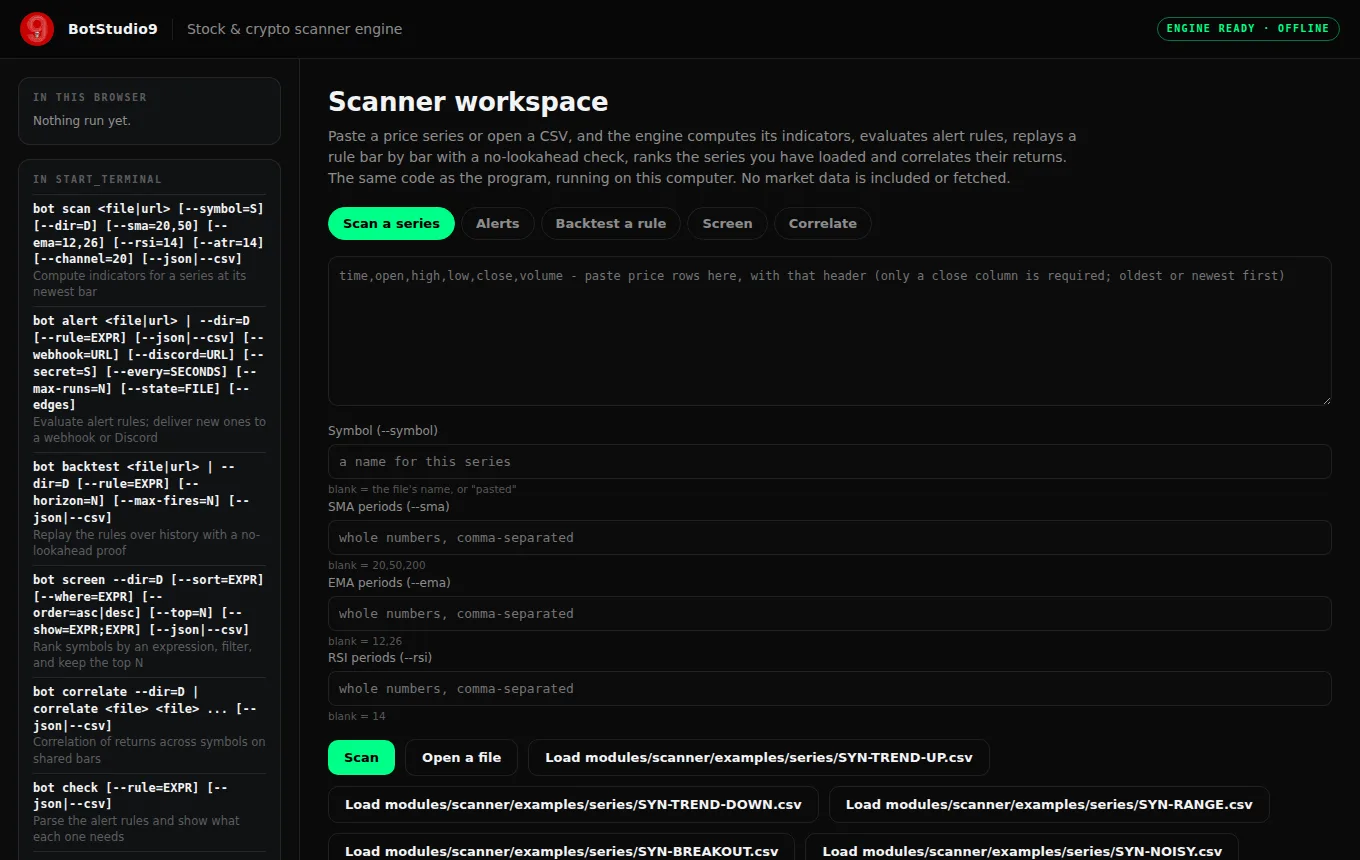
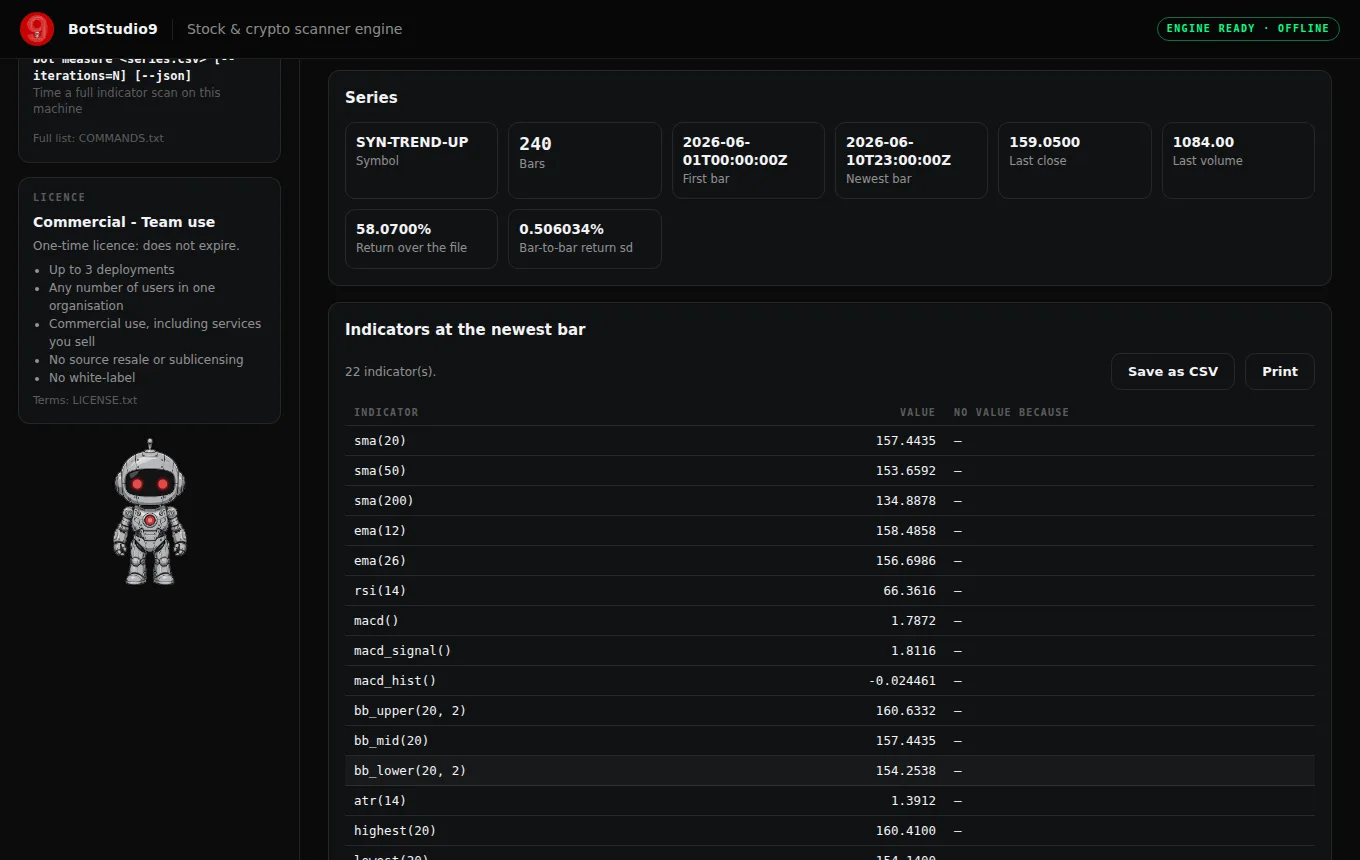
- Blank until you run it, then only real numbers. It opens empty. Every figure after that is computed by the engine while you watch, or is a dated measurement. No market data, no pre-loaded tickers, no invented alerts or live counters.
- Nothing to set up. No Python, no pip packages, no admin rights, no account. It opens a web page; it does not install software or open a port.
- Terminal inside the page. Type
bot scan modules/scanner/examples/series/SYN-TREND-UP.csvand the engine prints what the program prints, and fills the panels. The full program is in the same folder: START_TERMINAL runs it in a terminal window. - One-time licence available.
On screen: Scan a series or Alerts or Backtest a rule or Screen or Correlate · Series · Indicators at the newest bar · Series loaded in this page · Notes from the engine · Rules at the newest bar · Alerts · Series checked · Replay · Rules replayed over the file · When each rule fired · Screen · Ranked · Left out · Shared window · Correlation of returns (Pearson r) · Pairs · Per symbol, over the shared bars · Terminal
TEST IT - LIVE RUN
Runs the Market scanner engine this listing ships - compiled C++, on our server, right now. What you see is its real output and real timing. This server has fewer cores than the machine the listed figures were measured on, so expect lower numbers here. series/ holds five synthetic 240-bar series (uptrend, downtrend, range, breakout, noise) generated for the demo, and config/agent.json holds five rules. Not market data; nothing here predicts prices.
Pick a command below or type one, then press Enter. One command per run; this is a read-only demo copy of the engine, and nothing you type is kept.
- 22 indicators at the newest bar
- The five configured rules: what each needs
- A typo, with a caret under it
- Which rules are true right now, per symbol
- Breakout rule over history vs any bar
- Rank symbols by distance from their 50-bar average
- Trending symbols, least overbought first, as CSV
- Correlation matrix of the five series
- Time a full scan on this server